Mouse Toy
Research
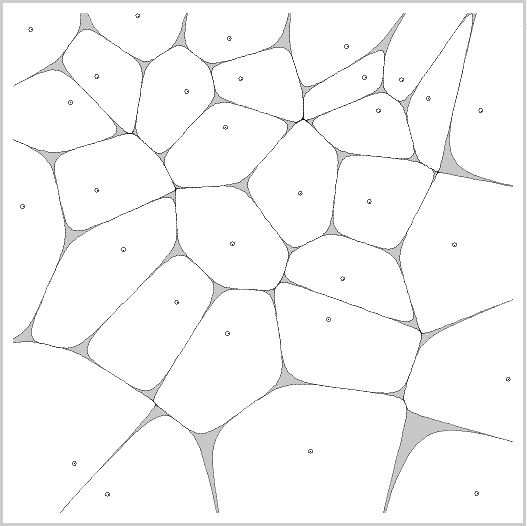
This one that I found is called "Cells" made by 'Don Havey'. It's name does give it away straight away once the application has loaded up. There's also not much interactivity that goes within this, all it is that the mouse pointer controls one of the cells where we can move it around freely. The thing I liked about this one is that it is very fluid, and it runs very well. There's no lag that goes on between any of the cells created and it just keeps moving by itself in different locations. I could somehow incorporate this into mine simply because of the swift movements within it.
Process found at - http://www.openprocessing.org/sketch/6888
Thursday, 27 September 2012
DSDN 142: Project 3
Mouse Toy
Research
Like all of my previous projects for coding, I visited the http://www.openprocessing.org website for inspiration and research. What I'm looking for are process applications that are interactive and are fun to use, ones that fit in the description of my project and ones that capture my interest.
The first one that came across was called the "Ragdoll Aquarium" made by 'Jared Counts'.
It is pretty self explanatory where you get a space full of little ragdoll people, and they react when you swipe your mouse pointer while holding it down around the screen. I found this very entertaining and although it is a one trick pony, couldn't help myself but play with it more.
Process found here - http://www.openprocessing.org/sketch/22598
Research
Like all of my previous projects for coding, I visited the http://www.openprocessing.org website for inspiration and research. What I'm looking for are process applications that are interactive and are fun to use, ones that fit in the description of my project and ones that capture my interest.
The first one that came across was called the "Ragdoll Aquarium" made by 'Jared Counts'.
It is pretty self explanatory where you get a space full of little ragdoll people, and they react when you swipe your mouse pointer while holding it down around the screen. I found this very entertaining and although it is a one trick pony, couldn't help myself but play with it more.
Process found here - http://www.openprocessing.org/sketch/22598
DSDN 142: Project 3
Mouse Toy
This project unlike the previous 2, explores an area that is unique to
computer programming, which is digital interactivity. In other words, it requires the movement of the mouse. In this project I am to create an
interactive application that engages the user in a fun and unique interaction. To do this I'll need to explore the
difference between control and interaction.
Lecture 13/9/12 Notes
3 important things to learn
- what is the person learning from this interaction?
- how long will it take a user, to completely learn this system?
- will it still be interesting once they've learnt it?
The actual project outline can be found here:
http://schoolofdesign.ac.nz/pluginfile.php/4752/mod_resource/content/1/Project%203%20outline.pdf
Lecture 13/9/12 Notes
3 important things to learn
- what is the person learning from this interaction?
- how long will it take a user, to completely learn this system?
- will it still be interesting once they've learnt it?
The actual project outline can be found here:
http://schoolofdesign.ac.nz/pluginfile.php/4752/mod_resource/content/1/Project%203%20outline.pdf
Thursday, 13 September 2012
DSDN 112: Project 2
Navigation Interface
Research
Concept 3
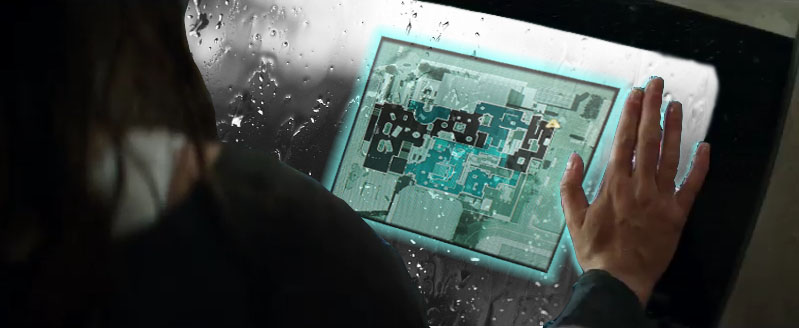
For my last concept, I got my inspiration from the movie 'Total Recall' (2012 version). This movie is set in the future, so this idea will have to be a futuristic one. There was a part in the movie where the person had received a phone call, but the phone was actually surgically inside their hand/palm. They could talk to it and hear through it, but the amazing was the video chat. When he put his hand up against the glass, a little mini hologram like screen came up on the glass, make it a portable screen which honestly looked awesome. I wanted to incorporate this within one of my concepts. This is a futuristic idea, and I'm not all keen on the fact of getting a phone to be placed inside my hand, but this can be easily replaced by maybe a glove? Or a little device that sticks onto the glass. When putting it upon the glass, a little screen pops up next to your hand, with a map of the campus. Of course it's going to be interactive so you could enter in your location and destination and it'll guide you through the way, plus if you get stuck just find a piece of glass and search again. I took the original image from Total Recall and photoshopped my own with the map and glass in it.
Research
Concept 3
For my last concept, I got my inspiration from the movie 'Total Recall' (2012 version). This movie is set in the future, so this idea will have to be a futuristic one. There was a part in the movie where the person had received a phone call, but the phone was actually surgically inside their hand/palm. They could talk to it and hear through it, but the amazing was the video chat. When he put his hand up against the glass, a little mini hologram like screen came up on the glass, make it a portable screen which honestly looked awesome. I wanted to incorporate this within one of my concepts. This is a futuristic idea, and I'm not all keen on the fact of getting a phone to be placed inside my hand, but this can be easily replaced by maybe a glove? Or a little device that sticks onto the glass. When putting it upon the glass, a little screen pops up next to your hand, with a map of the campus. Of course it's going to be interactive so you could enter in your location and destination and it'll guide you through the way, plus if you get stuck just find a piece of glass and search again. I took the original image from Total Recall and photoshopped my own with the map and glass in it.
DSDN 112: Project 2
Navigation Interface
Research
Concept 2
My second idea was inspired from google maps and google street view. Mostly everyone has used google street view before, surprisingly only to view their own house but we all know how it works. It's interactive, you travel through the streets and it gives you full 360 degree images that show you what the location looks like. I thought it would be cool to incorporate this into an app once again for smartphone users. It will be solely built just for uni purposes, and only contain the map within the uni itself. So it will be highly advanced and very detailed since theres only the campus to integrate into the app. Now for phone users, I came up with the idea before that it would be a downloadable app so it doesn't need constant internet access to run. You would start it up and enter your current location and your destination, then simply the map will bring you to where you currently are and show you simple arrows to where you need to go. I have tried my best to photoshop this idea into an image below.
Research
Concept 2
My second idea was inspired from google maps and google street view. Mostly everyone has used google street view before, surprisingly only to view their own house but we all know how it works. It's interactive, you travel through the streets and it gives you full 360 degree images that show you what the location looks like. I thought it would be cool to incorporate this into an app once again for smartphone users. It will be solely built just for uni purposes, and only contain the map within the uni itself. So it will be highly advanced and very detailed since theres only the campus to integrate into the app. Now for phone users, I came up with the idea before that it would be a downloadable app so it doesn't need constant internet access to run. You would start it up and enter your current location and your destination, then simply the map will bring you to where you currently are and show you simple arrows to where you need to go. I have tried my best to photoshop this idea into an image below.
DSDN 112: Project 2
Navigation Interface
Research
Concept 1
My first concept was inspired from video games, of course. I am a big fan of video games and online multiplayer games, and there were a few games that caught my interest. The one thing that would be awesome to see, was a real life map/radar straight on your phone, revealing your exact location. I got this idea from the Call of Duty games, and most gamers would definitely recognise it. As we can see from the the example below, the yellow triangle is the user/us. Let's just say the green triangles are other students as well and the red dots well, they could be random check-in stations (just an idea). This app will be workable on your iPhone or android or other devices, maybe it can be a device itself who knows. But as you're walking along, the yellow arrow moves with your exact location. Now that would be cool! So at the same time, it has kind of an in-game feature to it thats brought out to real life situations.
Research
Concept 1
My first concept was inspired from video games, of course. I am a big fan of video games and online multiplayer games, and there were a few games that caught my interest. The one thing that would be awesome to see, was a real life map/radar straight on your phone, revealing your exact location. I got this idea from the Call of Duty games, and most gamers would definitely recognise it. As we can see from the the example below, the yellow triangle is the user/us. Let's just say the green triangles are other students as well and the red dots well, they could be random check-in stations (just an idea). This app will be workable on your iPhone or android or other devices, maybe it can be a device itself who knows. But as you're walking along, the yellow arrow moves with your exact location. Now that would be cool! So at the same time, it has kind of an in-game feature to it thats brought out to real life situations.
DSDN 112: Project 2
Navigation Interface
Research
For the first studio session we had for this project, we were properly introduced to the second and last project for this paper. For this weeks homework, we are asked to have 3 concepts for our app. I have research around, having a look at existing apps, existing gadgets and have a fair few ideas that come to mind. But with this project there are 2 choices for us, we can either create an app for this modern day, or one that will be used later on in the distant futuristic future. I am still unsure on what my 3 main ideas will be yet, so I', just going to clear my mind of every idea I have and develop them to better ones later.
Here are my modern day ideas:
I wanted to focus solely on the idea of using and incorporating this app idea, into everyone's iPhone, smart phone or android. To create an app just solely for students who need to navigate their way around the campus of Victoria University of Wellington. My first app idea is going to require me to walk around the whole Kelburn campus, and take photos similar to google street view. This way, the student will know where to go and what the place exactly looks like. The different idea with this app, is that it is a downloadable one which means it doesn't require internet access, just a one time download and then you can set your 2 location, point A to point B giving you the best directions to go with the hallway views.
The second idea is similar to the last one, but more simplified. Instead of real images used, it is more of a animated version of the map. Pretty much a simple walk here then walk there, turn right etc direction system. Using the exact map but all computer generated and drawn images instead of real life photos.
With every great idea there are always cons that go along with it. One thing I know for sure is that the hallways or building itself changes and aren't always exact, like the major construction that's going on at the moment near the library in Kelburn. If the app were to come out now, it wouldn't be perfect say in a years time. This will mean a lot of constant updates for the users which require a lot of downloading. I have an iPhone at the moment and believe it's annoying enough having to update all the apps I have.
Here are my futuristic ideas:
Have you watched the latest blockbuster Total Recall? Directed by Len Wisemen and starring Colin Farrell. It is a science fiction/futuristic film, where there was a part of the film that caught my interest, and everyone else's for that matter. They had a mini 'cellphone' held on the inside of their palm/hand, where they could make phone calls. But the fascinating thing that happened was whenever they put their hand flat on the glass, a little screen would pop up on the glass like a hologram type of thing. They were able to interact with it, make video calls as well. An idea of this could be incorporated to my app idea of the future, where students can place their hand on glass, and use this new invention to find their way around using the in-built navigation within the palm of their hand. Developing this idea more, I could have this used on all different types of surfaces, like a table for example using a simple infrared hologram, like the ones we have today.
Research
For the first studio session we had for this project, we were properly introduced to the second and last project for this paper. For this weeks homework, we are asked to have 3 concepts for our app. I have research around, having a look at existing apps, existing gadgets and have a fair few ideas that come to mind. But with this project there are 2 choices for us, we can either create an app for this modern day, or one that will be used later on in the distant futuristic future. I am still unsure on what my 3 main ideas will be yet, so I', just going to clear my mind of every idea I have and develop them to better ones later.
Here are my modern day ideas:
I wanted to focus solely on the idea of using and incorporating this app idea, into everyone's iPhone, smart phone or android. To create an app just solely for students who need to navigate their way around the campus of Victoria University of Wellington. My first app idea is going to require me to walk around the whole Kelburn campus, and take photos similar to google street view. This way, the student will know where to go and what the place exactly looks like. The different idea with this app, is that it is a downloadable one which means it doesn't require internet access, just a one time download and then you can set your 2 location, point A to point B giving you the best directions to go with the hallway views.
The second idea is similar to the last one, but more simplified. Instead of real images used, it is more of a animated version of the map. Pretty much a simple walk here then walk there, turn right etc direction system. Using the exact map but all computer generated and drawn images instead of real life photos.
With every great idea there are always cons that go along with it. One thing I know for sure is that the hallways or building itself changes and aren't always exact, like the major construction that's going on at the moment near the library in Kelburn. If the app were to come out now, it wouldn't be perfect say in a years time. This will mean a lot of constant updates for the users which require a lot of downloading. I have an iPhone at the moment and believe it's annoying enough having to update all the apps I have.
Here are my futuristic ideas:
Have you watched the latest blockbuster Total Recall? Directed by Len Wisemen and starring Colin Farrell. It is a science fiction/futuristic film, where there was a part of the film that caught my interest, and everyone else's for that matter. They had a mini 'cellphone' held on the inside of their palm/hand, where they could make phone calls. But the fascinating thing that happened was whenever they put their hand flat on the glass, a little screen would pop up on the glass like a hologram type of thing. They were able to interact with it, make video calls as well. An idea of this could be incorporated to my app idea of the future, where students can place their hand on glass, and use this new invention to find their way around using the in-built navigation within the palm of their hand. Developing this idea more, I could have this used on all different types of surfaces, like a table for example using a simple infrared hologram, like the ones we have today.
Subscribe to:
Posts (Atom)